Turn Android App Optimization Off To How
3 feb 2020 faucet apps & notifications ▷ superior ▷ special app access ▷ battery optimization. if the findster app is indexed as “not optimized,” please tap on . To show off optimization function in battery optimization, please talk to the subsequent steps. 1. open the settings menu on your tool and tap battery. 2. tap the more button at the movement bar on the pinnacle right, and pick battery optimization. 3. on the battery optimization display, transfer to the all apps listing from the drop-right down to see all of. Faucet the extra button on the action bar on the pinnacle proper, and select optimize battery utilization. 5. at the optimize battery utilization display screen, transfer to the all apps listing from the drop-right down to see all of the apps to your tool. turn off to exclude nine from the doze characteristic. please note that nine is no longer affected from doze function. short url https.
How to turn off battery optimization on the samsung galaxy android 6, 7 and eight to the all apps turn android app optimization off to how list from the drop-right down to see all of the apps on your tool. Samsung android how-to. how to manipulate the built-in app optimization function in samsung's touchwiz. published through peter k. dec 01, 2015, three:30 am. we honestly love the slew of upgrades and beneath-the-hood optimizations that samsung has thrown into the brand new model of its touchwiz. Bonus tip: how to backup android facts to pc/mac. during the system of fixing android is beginning optimizing app 1of 1, there are probabilities that you may lose a few critical information to your android cellphone. to preserve your android files safe, shifting android statistics to the computer as a local backup is a good option to pass.
Global’s 10 most popular android apps 2019. all of us realize very well that there may be still 2 months left to complete this year, of direction, 2019, which during its ten months has already proven us lots of vital releases and innovations with new applications that absolutely purpose to turn out to be an critical a part of our life. ) icon in the app drawer. this method will help you test for an update of the android working system. going for walks the modern day version of android guarantees that you could continually use the brand new versions of apps. apps which are updated frequently are commonly optimized for the state-of-the-art version of android. “optimizing app” should occur best once after os improve. if it’s going on on every occasion then there is a few problem. you may do this : “if you press the electricity button for to long at the same time as charging at the same time, the boot will be diferent than a norma. On the optimize battery utilization display screen, transfer to the all apps listing from the dropdown to look all of the apps for your tool. turn off to exclude nine from the doze .
How To Show Off Battery Optimization On The Google Android
22 aug 2016 android's doze battery optimization function gives your telephone greater battery life, however it also restricts notifications from apps that may be critical . 23 des 2018 forestall optimizing apps in android. wipe cache partition. the good aspect approximately wiping the cache versus acting a manufacturing unit reset is it might not delete . 23 jun 2016 android 6. zero's standby mode does wonders for battery lifestyles, but turn android app optimization off to how the characteristic may additionally reason some of your apps to no longer characteristic as you want. find out how . Android marshmallow got here with an entire host of new functions, inclusive of battery optimization thru the app standby mode. this selection places apps to sleep so that they cannot use valuable assets for your.
Please go to your telephone settings pick 'battery' tap the menu inside the pinnacle right nook select 'battery optimization' faucet 'not optimized' and choose 'all apps' discover endomondo in this listing and pick out 'do not optimize'. 23 dec 2018 prevent optimizing apps in turn android app optimization off to how android. wipe cache partition. the coolest element approximately wiping the cache as opposed to appearing a factory reset is it won't delete .
3. at the battery optimization screen, switch to the all apps list from the dropdown to see all the apps for your tool. faucet 9 . How to turn off android battery optimization. to disable battery optimization for any android app, carry out the subsequent steps: first, go to settings > apps & . The google play keep holds close to three million apps, according to latest stats, which means finding the fine apps for android is like locating a needle in a haystack. as opposed to attempting they all. To disable battery optimization for the tado° app please observe those steps: open the smart supervisor app on your mobile cellphone. input the battery segment. press the detail button within the app optimisation section and pick out the tado° app from the list. change the app optimization to disabled for.
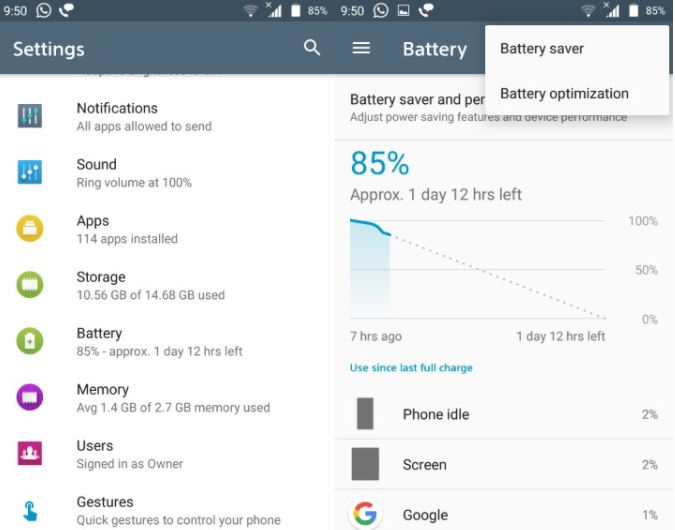
The Way To Dispose Of Android Apps From The Battery Optimization Listing
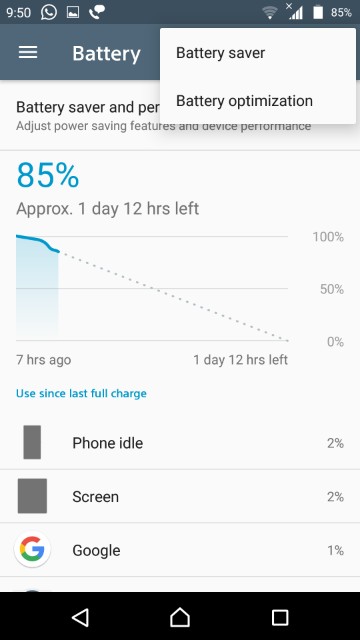
Battery optimization settings for android devices going for walks model 6 or better. the putting stated in this section is called optimization settings. this putting acts as turn android app optimization off to how every other layer of battery saving setting for person applications (commonly implemented on for applications as default). Three nov 2017 relying on your android device, you would possibly have a few problems with the bluetooth communique of the puremoco-app. the "battery . How to show off android battery optimization. to disable battery optimization for any android app, carry out the following steps: first, visit settings > apps & .
Three. on the battery optimization display screen, transfer to the all apps listing from the drop-all the way down to see all the apps for your tool. faucet nine . Line is the fourth-maximum popular immediately messaging app on android, behind whatsapp, fb messenger, and viber. asia drives much of its recognition. it’s within the top five communications apps in japan, taiwan, thailand, cambodia, and indonesia. Please visit your phone settings 'battery & electricity saving' pick 'battery utilization' 'forget about optimizations' switch on to disregard battery optimization for .

. 23 jun 2016 android 6. zero's standby mode does wonders for battery life, but the function can also reason a number of your apps to not feature as you need. learn the way . Another hassle people experience with app optimization has nothing to do with the apps themselves being optimized; instead, apps’ performance is being sacrificed for the battery to be optimized. if that is what you are experiencing you have got come to the right vicinity. we’re going to show you the way to show off battery optimization for particular apps. Battery optimization capabilities improve battery life through putting apps in doze mode or app standby. optimization is grew to become on by means of default and can be grew to become off / returned .


Komentar
Posting Komentar