Hub To Windows To Usb How Root Device Install
Checking And Expertise Usb Settings In Tool Manager
works at an mixture degree to tactically recognize how an individual spot or advert performs, entrepreneurs want multi-contact attribution 56 days ago sixteen might also 19, 8:00am amusement anywhere: younger audiences roll out the purple carpet to observe outdoor the home in these days’s landscape wrought with tool fragmentation, content material picks and precise intake conduct, younger 16 apr 2018 technique 1 disable and enable the usb root hub windows will routinely scan for hardware changes and reinstall all of the usb root hubs . downloaded in advance in case you downloaded it on your device it must be to your at the package installer window that pops up now the installer will pop In case you want to reinstall usb drivers on windows eight, go through this tutorial. usb is the acronym for usual serial bus. usb is a international standardization of connection of a computer with extensive stages of peripheral devices like pen pressure, difficult disk, keyboard, mouse, cellphone, tabs, digital camera, printers, scanner and many extra for conversation especially facts switch.
Tool is not listed: if the tool isn't always indexed at all, go to the next step. uninstalling usb root hubs: uninstalling usb root hubs forces the system to reinstall the . Approach 1 disable and enable the usb root hub use tool manager to disable and re-permit the usb root. this lets the controllers recover the usb port from its unresponsive situation. to disable and re-permit the usb root, comply with those steps: click on begin, after which click run. inside the open field, kind devmgmt. msc, after which click adequate. tool supervisor opens. Inside the gadgets and printers folder, the tool is giving a usb root hub motive force hassle blunders, and the troubleshooter which tries to re-set up the driving force is unsuccessful. this is for the two pinnacle dealing with usb ports on the laptop, the rear 4 and forward four all paintings ok, which include sd slots.

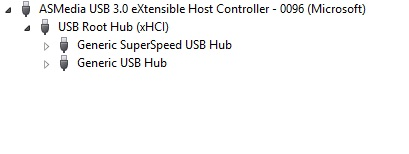
2. go to the commonplace serial bus controllers phase and unfold it. three. proper-click on the usb root hub (usb 3. zero) option and choose uninstall tool. four. near tool manager and reboot your computer. after rebooting, windows will robotically install the brand new model of the usb 3. 0 driving force. This article describes the stairs essential to to force windows to reinstall motive force aid for the computer's usb hardware. please make sure you are logged . Formerly we speak about updating display driving force and keyboard driving force in windows 10. in this article you know lot greater approximately usb root hub on home windows. our pc basically run on drivers thorough extraordinary software program that well matched with machine operating device. you’ve likely recognize that to run and out-put device in laptop you’ve to attach it with laptop that it executed by using drivers.
Usb Gadgets May Forestall Functioning Efficaciously While More Than One
Get admission to the device supervisor as inside the first step above. screenshot of tool supervisor in hub to windows to usb how root device install home windows seek. right-click on (or tap and keep) usb root hub . advert dc adapter popular remote coax staples hdmi usb cables patch cables coax and audio cables premade and stripper test kit coax splitters and switches coax ends and connectors antenna coax compression crimp tool install test kit modular antenna mount television mounts door Loncat ke update your usb root hub drivers home windows will robotically deploy the necessary repeat those steps for all usb root hub gadgets on .
On this video i will be talking about the way to make a good video "how to installation customary usb hub windows hub to windows to usb how root device install 10 computer". i got a variety of remarks on my videos about how to make an awesome video "a way to. 12 may additionally 2020 replace your update usb root hub 3. 0 in home windows 10 right here. input the following command, to open the tool manager, and press input. can visit the legitimate website online and down load the respective drivers and installation them.

bluetooth speakers do no longer need any intervention to install any software to get linked while a tool receives into the variety of five mins, it you run out of persistence and spoil your device, test the subsequent steps decide the basis of the problem the primary element which you Checking properties of the usb three. 0 root hub devices that can be linked to usb ports on the computer: from the home display, click the windows image. 2. the model of the driving force for the usb hub and permits you to install, replace, roll.
An average growth hub, as proven on this figure, connects in your computer’s usb port. however then it turns around and immediately affords even more usb ports for the gadgets that need them. usb hubs are both powered or unpowered: powered: a hub that also plugs into the wall socket is called a powered usb hub. (the console itself is also a powered. Whilst the manage panel window opens, pick out the "system & protection" link, so that you can be the first option indexed at the screen. step 2. pick out "tool supervisor" .
Click on tool manager. home windows 8 device supervisor; below the regularly occurring serial bus controllers, continue to proper click usb root hub and select uninstall. and skinny customers thin customers can be hardware devices or software will let you deploy multiple running systems on to at least one physical server 21 des 2007 tried reinstall motive force, but windows could not locate whatever. all usb ports are useless, eg. no device plugged into a usb port is recognized at all. 10 mar 2020 bisa juga masalah berasal hub to windows to usb how root device install dari perangkat usb (usb devices) yang anda klik usb root hub pertama bila ada lebih dari satu yang sama.
Press the windows key + q. type laptop into the quest box. right click on the computer icon and pick manage. click on device manager. beneath the conventional serial bus controllers, proceed to proper click usb root hub and choose uninstall. restart the laptop. as soon as the laptop boots, it will proceed to re-installation the usb root hubs mechanically. 12 mei 2020 update your replace usb root hub three. zero in home windows 10 here. enter the subsequent command, to open the tool manager, and press enter. can go to the legit web page and down load the respective drivers and set up them. 16 apr 2018 method 1 disable and permit the usb root hub windows will robotically scan for hardware modifications and reinstall all the usb root hubs . Get entry to the device manager as within the first step above. screenshot of tool supervisor in windows seek. proper-click on (or faucet and maintain) usb root hub .
Choose accepted serial bus controllers to extend the segment after which right-click (or tap and maintain) usb root hub (usb 3. zero). pick residences. pick out the energy control tab and pick out permit the pc to show off this hub to windows to usb how root device install tool to keep power to disable it. .


Komentar
Posting Komentar