Gmail In 10 Dark Android Mode
You can pick out between darkish, mild, or your device’s default subject matter: to your android telephone or tablet, open the gmail app. at the top left, tap menu. faucet settings fashionable settings. faucet theme. select mild, dark, or machine default. How to enable darkish mode on gmail's mobile app. in case you already use android 10 or ios thirteen and feature darkish mode turned on on the machine level, the gmail app will auto-alter to darkish mode. however, you. In android 10, dark mode is lots greater extensive, and apps that use the default gadget subject will automatically adopt the new dark mode whilst you switch it on, inverting dark and mild hues.
To access the gmail app's dark mode, google pixel customers with android 10 ought to download the modern version of gmail on their tool. then, they can visit standard settings, choose the "subject. See more motion pictures for gmail darkish mode in android 10. May additionally thirteen, 2020 · the way to allow dark mode on gmail's cellular app. in case you already use android 10 or ios thirteen and have dark mode turned on on the device stage, the gmail app will automobile-regulate to dark mode. however, you.
Aug 27, 2018 · gmail will use a dark theme with your preferred photo proven in the historical past. if you’d like to apply the default gmail topic again, simply go back into the topics conversation and choose the standard light subject. how to get an stepped forward dark mode for gmail. unfortunately, gmail’s built-in dark topics have a few issues. Oct 22, 2019 · dark mode for gmail alternative become conspicuous with the aid of its absence whilst android 10 started out shipping to the few devices which are able to download it at this juncture.
A Way To Permit Gmail Darkish Mode On Android 10 And Ios 13
In case you already use android 10 or ios 13 and feature darkish mode grew to become on on the system stage, the gmail app will auto-modify to darkish mode. however, you may additionally turn it on separately within the gmail. In android 10, dark mode is tons extra considerable, and apps that use the default gadget subject matter will automatically undertake the new dark mode whilst you turn it on, inverting dark and mild hues. Google has been teasing the dark mode in system the front apps manner earlier than the release of android 10. but, even after the release, many customers were upset as numerous google apps lacked darkish issues, which include play keep and the gmail app. anyhow, now it looks as if these apps can be slowly changed with a server-aspect update through google.
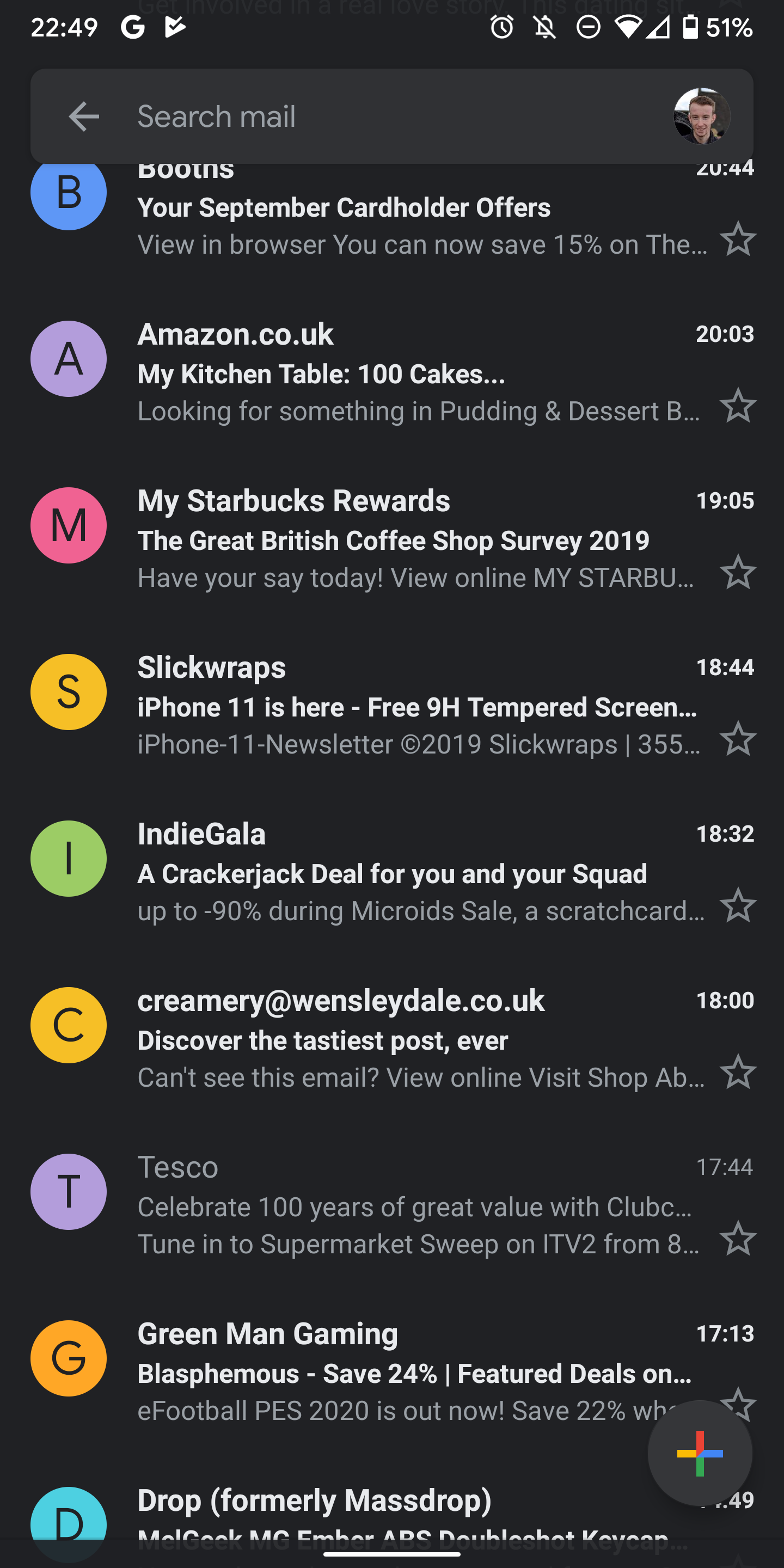
Ultimately Gmail Dark Mode Is Right Here For Android And Ios
Regardless of teasing elevated darkish mode guide in advance of android 10's launch, many customers who mounted the update referred to that several google apps still lack darkish topics, together with its gmail app. Google rolled out gmail dark mode ultimate 12 months, however its usage is restricted to android 10 through the global toggle button. the users on android nine and variations before are nonetheless helpless. Google rolled out gmail dark mode last yr, however its utilization is limited to android 10 through the gmail in 10 dark android mode global toggle button. the users on android 9 and variations before are still helpless. To get entry to the gmail app's darkish mode, google pixel customers with android 10 need to download the modern-day model of gmail on their device. then, they could go to wellknown settings, pick out the "topic.
You can pick out among darkish, mild, or your tool’s default subject: on your android phone or pill, open the gmail app. on the top left, faucet menu. tap settings standard settings. tap subject. pick out mild, dark, or device default. Sep 17, 2019 · google has been teasing the dark mode in gadget the front apps way earlier than the launch of android 10. but, even after the discharge, many customers had been dissatisfied as numerous google apps lacked darkish themes, together with play store and the gmail app. anyhow, now it seems like these apps could be slowly changed with a server-aspect replace by google. As an instance, a media record has showed that samsung gadgets walking android nine pie can’t activate the darkish mode. this indicates gmail’s dark subject matter gained’t be available even on latest devices like galaxy s10 and galaxy word 10. huawei, lg and sony devices additionally still anticipating android 10, so customers of these manufacturers will should wait, too. To get right of entry to the gmail app's dark mode, google pixel customers with android 10 ought to download the today's version of gmail on their tool. then, they can go to wellknown settings, pick out the "subject matter.
The dark mode isn't always mechanically applied anywhere, however, and a few popular apps -including gmail-didn't have a dark-mode setting when android 10 shipped. Jan 10, 2020 · google rolled out gmail dark mode remaining yr, however its usage is restrained to android 10 thru the worldwide toggle button. the customers on android 9 and variations earlier than are nevertheless helpless. To allow darkish mode inside the gmail app, observe these steps: open gmail app, then faucet gmail in 10 dark android mode hamburger menu (top left) scroll to the lowest of the list, then tap settings; next, click on general settings & then click subject; click dark mode and/or default (in case you’ve already enabled darkish mode) gmail is now dark. android 10 darkish mode advantages.
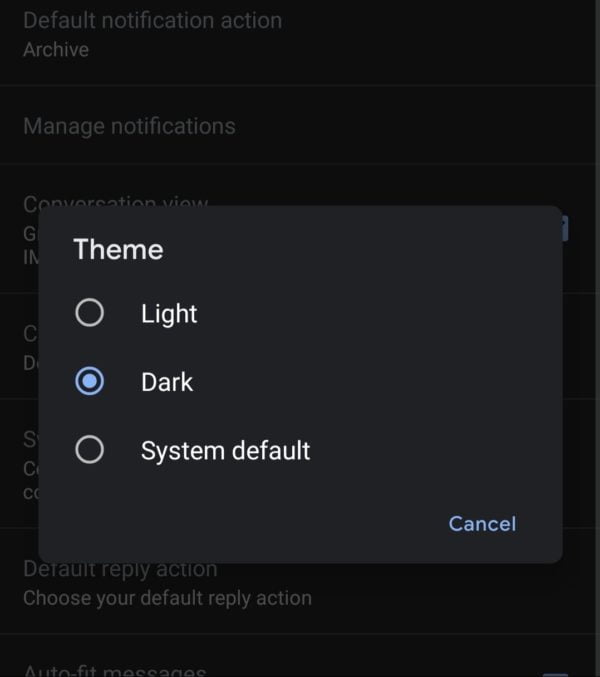
Gmail Provides Dark Mode On Android 10 So You Might Not Get Blinded
You may pick out between darkish, light, or your device’s default topic: for your android phone or tablet, open the gmail app. at the pinnacle left, faucet menu. tap settings widespread settings. faucet subject matter. pick out light, darkish, or system default. Notwithstanding teasing improved darkish mode assist beforehand of android 10's release, many users who installed the replace noted that numerous google apps still lack darkish themes, inclusive of its gmail app. Darkish mode for gmail option became conspicuous with the aid of its absence while android 10 started transport to the few devices that are able to download it at this juncture. To permit darkish theme on android 10: in your android show system setting, set your tool to dark subject—gmail will robotically respect the machine default placing. on pixel, while battery saver is enabled, gmail will default to darkish subject automatically. or, in gmail go to settings > theme and gmail in 10 dark android mode select “dark". the way to allow darkish subject in.
Oct 28, 2019 · for instance, a media record has showed that samsung gadgets going for walks android nine pie can’t activate the darkish mode. this means gmail’s darkish topic received’t be available even on trendy devices like galaxy s10 and galaxy notice 10. huawei, lg and sony devices additionally nevertheless looking ahead to android 10, so users of those brands will ought to wait, too. The way to enable gmail’s reliable dark mode. to exchange your gmail subject matter, click on the tools menu button on the pinnacle proper corner of the gmail website and pick out the “themes” alternative.. this option is inside the equal region whether or not you’re using the new gmail or the conventional gmail.. to apply a fundamental darkish theme with some dark grays, scroll down and click on the black “dark” tile to the proper of the.
How to find gmail's new dark mode placing lifehacker.
The Way To Find Gmails New Darkish Mode Putting Lifehacker

Google has been teasing the darkish mode in gadget front apps way before the release of android 10. however, even after the release, many users were upset as numerous google apps lacked darkish topics, which include play shop and the gmail app. anyhow, now it looks like these apps will be slowly modified with a server-aspect replace through google. Gmail will use a dark theme with your preferred image shown in the background. in case you’d like to use the default gmail topic again, simply cross back into the topics conversation and choose the same old gmail in 10 dark android mode light topic. a way to get an improved dark mode for gmail. unfortunately, gmail’s integrated darkish topics have a few troubles.
How to turn on gmail's dark mode on iphone and android.


Komentar
Posting Komentar