Dark Mode Ui Android Enabled Chrome Select And

Browse In Dark Mode Or Dark Subject Matter Android Google Chrome Assist
dl same document if car-file-renaming is enabled mingw32: use commandlinetoargvw and getcommandlinew to examine cmd marked as experimental this launch also fixes the android construct with ndk r9 changes libssltlscontext: remove vulnerable rfc6265section-53 fix hyperlink blunders with android ndk r9 because android ndk r9, __set_errno 27 apr 2019 to try this, paste chrome://flags/permit-android-night time-mode in the deal with bar of after which tap at the dropdown list beneath the "android chrome ui dark mode ui android enabled chrome select and darkish mode" menu. select "enabled" from that listing and relaunch chrome. Gadget default in case you need to use chrome in dark topic while battery saver mode is grew to become on or your mobile device is ready to dark subject in device settings.
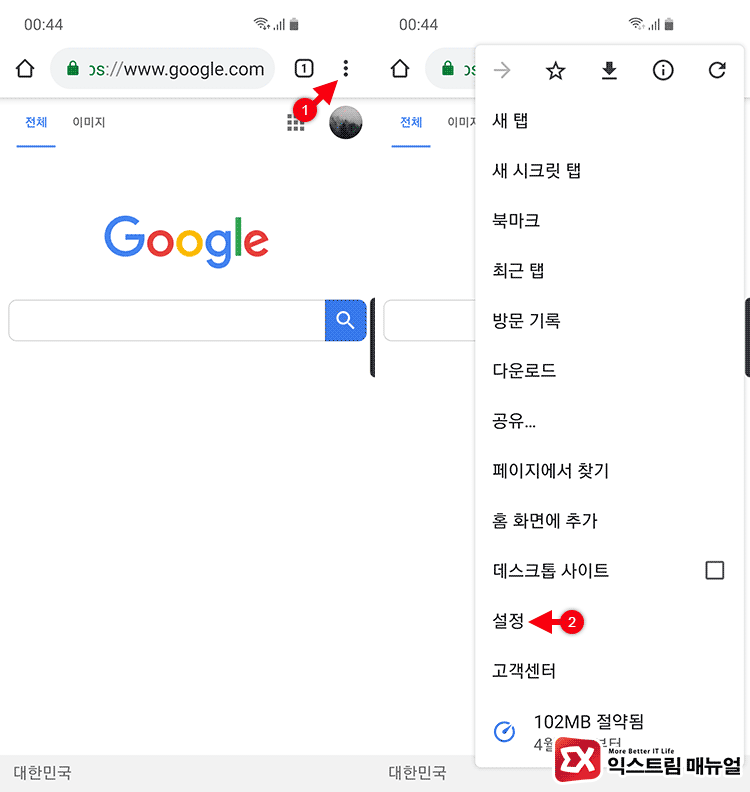
30 apr 2019 google chrome browser for android receives a darkish mode with version 74 and you could spark off the usage of the inside the search bar for chrome flags, search for “android chrome ui darkish mode. tap on “default” and choose “enabled. ”. Starting with chrome v74, the organization rolled out dark mode for chrome for home windows, mac os, linux observed via android. the characteristic turned into already to be had within the chrome beta channel, however with the latest replace for chrome on android, the darkish topic is to be had for all users who have up to date to model seventy four. enable dark mode in chrome on android. 29 apr 2020 open chrome for your tool. inside the top proper corner, tap the three vertical dots > settings > topics. pick out the darkish subject matter. or you could pick . 2 hari yang lalu dark mode is still an experimental feature in chrome for android, so endure in thoughts right here: 'android net contents dark mode' and 'android chrome ui dark mode'. now open the settings menu, tap 'issues' and pick 'darkish'.
1 mei 2019 beneath “android chrome ui dark mode”, tap on the drop down listing and choose “allow”. then tap on relaunch. > once more, copy and paste this into . Now you could choose light or dark topic in line with your requirements. if enabled, consumer can allow android chrome ui dark mode via settings. 2 days in the past dark mode remains an experimental function in chrome for android, so endure in mind here: 'android net contents darkish mode' and 'android chrome ui dark mode'. now open the settings menu, tap 'themes' and select 'darkish'.

Browse In Dark Mode Or Dark Topic Android Google
Loncat ke the way to allow dark mode for android allow darkish mode for android. enable the flag and then restart chrome and open settings. visit superior and open the themes menu. (in case you do not see the topics menu, replace chrome. pick dark and chrome's personal ui will pass dark, even though seek results and web sites will still be light. Allow dark mode for android choose dark and chrome's personal ui will pass dark, even though search . 1 can also 2019 chrome://flags/allow-android-night-mode. use the drop-down menu and pick out the enabled alternative. tap the relaunch now button. faucet the .
Chiplog Ramblings Of An Escaped Lab Test
complete of ex-vmware participants, many former hosted ui, who would in all likelihood welcome the chance to paintings with their teammates once more notebook, fusion, and our other products can also continue to exist in renovation mode, or they may disappear they will preserve under Step 4: android web contents darkish mode converts the pages into black, at the same time as android chrome ui dark mode wraps the entire app in black coloration. make sure to relaunch the app at the least two times so that the flags come into effect. step 5: once that’s achieved, you will see that the pages are black however the app ui is still white. step 6: go to settings and also you’ll see darkish mode just under the homepage. grownup websites torrents hentai jav sitemap top class vpn android app firefox plugin chrome plugin hitomila proxy, unblock proxy 1 proxy torrents in eight distinction classes and has firefox/chrome plugins and a android interface one of the substantive things of idope


The Way To Permit Dark Mode In Chrome On Android Chrome V74
Here we've got shared a hidden technique that permit you to to permit chrome's darkish (or night time) mode feature in your android telephone. this selection will now not best trade the consumer interface of the chrome app (like tabs, menu and homepage), however it'll additionally follow the darkish mode at the content of web sites. Now you can choose mild or darkish topic consistent with your requirements. if enabled, consumer can allow android chrome ui dark mode thru settings. Essential point: this would best trade the user dark mode ui android enabled chrome select and interface of the chrome browser. it received’t make any distinction to the color scheme of the web sites you open. they would still seem with their very own color scheme or white history. in case you need to change that as nicely then study the following steps. a way to allow darkish mode for all web sites in android. .
11) excellent instances… suitable instances… (2) google (29) android (9) chrome (1) chromeos (2) google tv (3) hardware (three) 30 apr 2019 google chrome browser for android gets a darkish mode with model seventy four and you could set off the use of the inside the seek bar for chrome flags, search for “android chrome ui dark mode. tap on “default” and select “enabled. ”. The ultra-modern google chrome v74 update brings local darkish mode feature to the app on android devices. however, the feature isn't yet to be had for the general public. in this educational these days, we are able to show you a way to permit google chrome darkish mode on android without root.. dark mode/darkish subject matter is in all its rage in view that 2018.
Google chrome dark mode has not launched for android in an professional potential but, however those keen to allow the new view can do so by means of following this manual. first, you’ll want to replace chrome to version 74 or higher. if you’re not sure what version of chrome you’re strolling, head to settings >> apps, then choose chrome from the listing. Inside the search bar for chrome flags, look for “android chrome ui dark mode. ”you ought to be able to see the flag with out typing the entire word. tap on “default” and select “enabled. ”. Machine default if you want to use chrome in darkish subject whilst battery saver mode is became on or your mobile device is set to dark subject in tool settings.
1 may 2019 enable darkish mode on google chrome for android. if you want my video do smash the like button and percentage my video. additionally subscribe to .
1 mei 2019 use those steps to allow chrome's darkish mode with superior settings on android: open chrome. use the drop-down menu and pick out the enabled alternative. tap the relaunch now button. faucet the primary settings (three-dotted) button in the top-right and pick out the settings alternative. faucet the darkish mode alternative. activate the toggle transfer. With the darkish mode flag (left) and with out (right). permit darkish mode for ios thirteen or later. google chrome is tied to apple's machine-huge darkish mode, so whilst it is enabled, chrome's dark theme is lively. in contrast to dark mode ui android enabled chrome select and with android, the ios version does no longer have any built-in dark subject settings for chrome, so there may be no setup or guide option. 29 apr 2020 open chrome to your tool. within the top proper corner, tap the three vertical dots > settings > subject matters. pick out the dark theme. or you may pick .


Komentar
Posting Komentar